

Description
SearchFIT gives you two ways to get content into WordPress. Webhook mode exposes a REST endpoint that lets you create, update, and list posts using an API key — accepting an incoming payload as-is. Import mode lets an administrator bulk-import a SearchFIT content-export CSV straight from the admin screen. Designed for AI content workflows (ChatGPT, Claude, Perplexity), no-code automation (Zapier, Make, n8n), and headless setups.
Features
- Two ingestion modes: accept an incoming webhook payload as-is, or bulk-import a SearchFIT content-export CSV
- Bulk CSV import with Markdown-to-HTML conversion, processed in batches with a live progress bar
- Slug-matched import — re-importing the same CSV updates existing posts instead of duplicating
- Auto-generated cryptographic API key with one-click regeneration
- Create, list, read, and update posts via REST
- Slug-based upsert — re-publishing the same slug updates the existing post instead of duplicating
- Featured images and inline content images downloaded from URLs you supply
- Category and tag management (creates missing categories on the fly)
- Custom post meta with a denylist for WordPress-internal keys
- SEO meta sync to Yoast SEO, Rank Math, SEOPress, and All in One SEO
- Multilingual support via Polylang and WPML
- JSON-LD
<script>blocks extracted, validated, and re-emitted in<head> - Optional embed allowlist for YouTube / Vimeo / SoundCloud / Spotify / Loom / TikTok / Apple Podcasts / Dailymotion
- Settings UI for default post status, author, category, tags, embeds, hero deduplication
- Health check endpoint and activity log
Security
- Cryptographic API key (
random_bytes) with timing-safe comparison - SSRF guard — outbound URL fetches reject private, loopback, link-local, and reserved IPs (IPv4 and IPv6)
- Custom-meta denylist blocks attempts to write
_edit_lock,_thumbnail_id,_wp_*and other WP internals - Iframes are off by default; when enabled, restricted to a strict host allowlist and src forced to https
- JSON-LD payloads are JSON-validated and re-encoded with
JSON_HEX_TAGflags before storage - Settings save flows through the WordPress Settings API (CSRF nonce + sanitize callbacks)
- WAF-friendly: auth runs inside handlers (so failed requests don’t trigger Wordfence/Sucuri lockout heuristics); POST-only methods (no PUT/PATCH); public health endpoint
API Reference
Full docs at searchfit.ai/docs. Quick example:
curl -X POST "https://yoursite.com/wp-json/searchfit/v1/articles" \
  -H "Content-Type: application/json" \
  -H "X-API-Key: YOUR_API_KEY" \
  -d '{
    "title": "My AI-Generated Article",
    "slug": "my-ai-article",
    "content": "<p>Your content here...</p>",
    "status": "draft",
    "categories": ["AI", "Technology"],
    "tags": ["ai-content", "automation"],
    "meta_description": "Short SEO description.",
    "featured_image_url": "https://example.com/image.jpg"
  }'
Privacy Policy
SearchFIT does not collect or transmit any personal data. API keys and the webhook activity log are stored in the WordPress database and never sent to external servers.
Screenshots
Installation
- Install and activate the plugin.
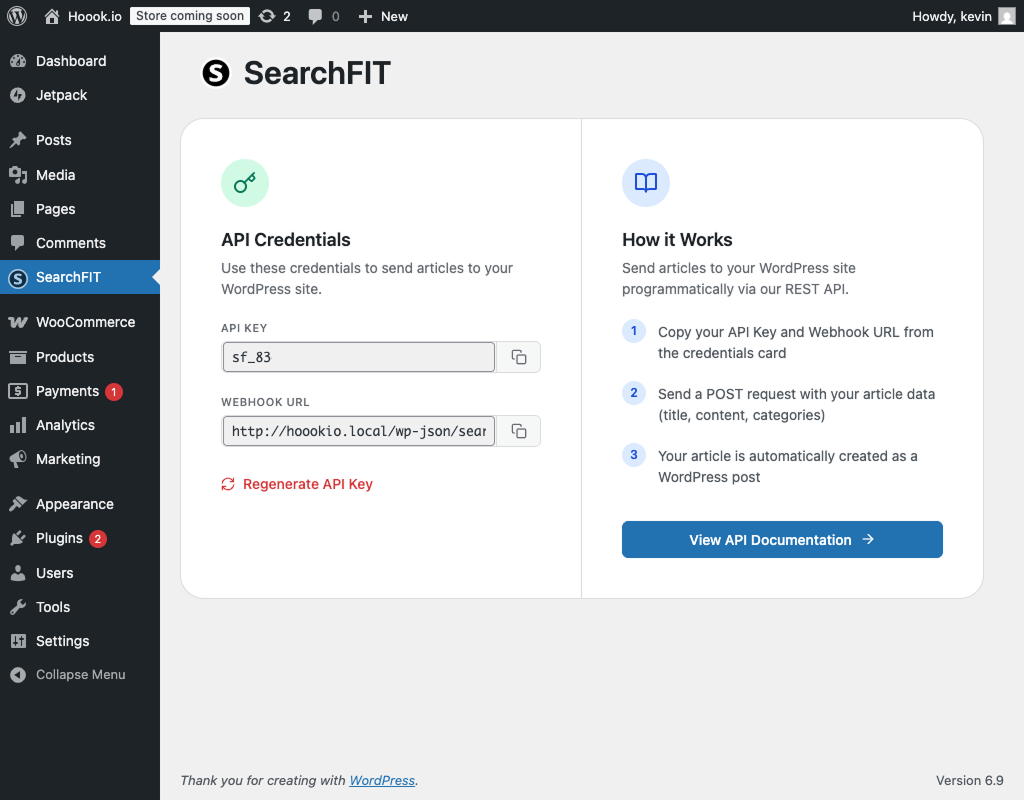
- Open SearchFIT in the admin menu and copy the API key and webhook URL.
- Webhook mode: send a
POSTto/wp-json/searchfit/v1/articleswithX-API-Key: <your key>and a JSON body. - Import mode: scroll to Bulk Import from CSV, drop in a SearchFIT content-export CSV, review the preview table, and click Start Import.
FAQ
-
What’s the difference between the two modes?
-
Webhook mode receives content pushed to your site over the REST API in real time — ideal for automated pipelines. Import mode is a one-off bulk operation: you upload a SearchFIT content-export CSV from the admin screen and it creates the posts. Both produce ordinary WordPress posts and share the same defaults (category, tags, author).
-
What format is the CSV, and how are columns mapped?
-
It’s the SearchFIT content export. Expected columns: Title, Slug, Type, Status, Locale, Target Keyword, Meta Description, Word Count, Read Time (min), Article Score, Keyword Difficulty, Search Volume, Scheduled Date, Content. Title post title, Slug post slug, Content post body, Meta Description + Target Keyword SEO fields (synced to Yoast / Rank Math / SEOPress / AIOSEO), Locale language (via Polylang/WPML). The remaining analytical columns are stored as
searchfit_*post meta so nothing is lost. Only Title and Content are strictly required. -
Do I need to choose a content format when importing?
-
No. SearchFIT exports the Content column as Markdown, so the importer converts it to clean post HTML for you automatically — there’s nothing to configure.
-
What happens on re-import, or if a slug already exists?
-
Rows are matched to existing posts by slug. You choose whether a match updates the existing post (safe to re-run) or is skipped. Newly created posts also receive the category, tags, and author from your Webhook Defaults (each overridable per-import).
-
How are statuses and scheduled dates handled?
-
You can keep the CSV’s status or force everything to draft/pending/publish. When keeping the CSV status, a
scheduledrow with a future date becomes a genuine WordPress scheduled post; a past date publishes at that date. -
Is the CSV import safe on large files?
-
Yes. The file is parsed once, then imported in small AJAX batches with a live progress bar, so it won’t hit PHP’s execution-time limit. You see a preview of the first rows before anything is written.
-
How do I get my API key?
-
Open the SearchFIT admin page. The key is generated automatically on activation and displayed there.
-
Can I regenerate the key?
-
Yes — click Regenerate API Key. The old key stops working immediately, so update integrations first.
-
Which post statuses are supported?
-
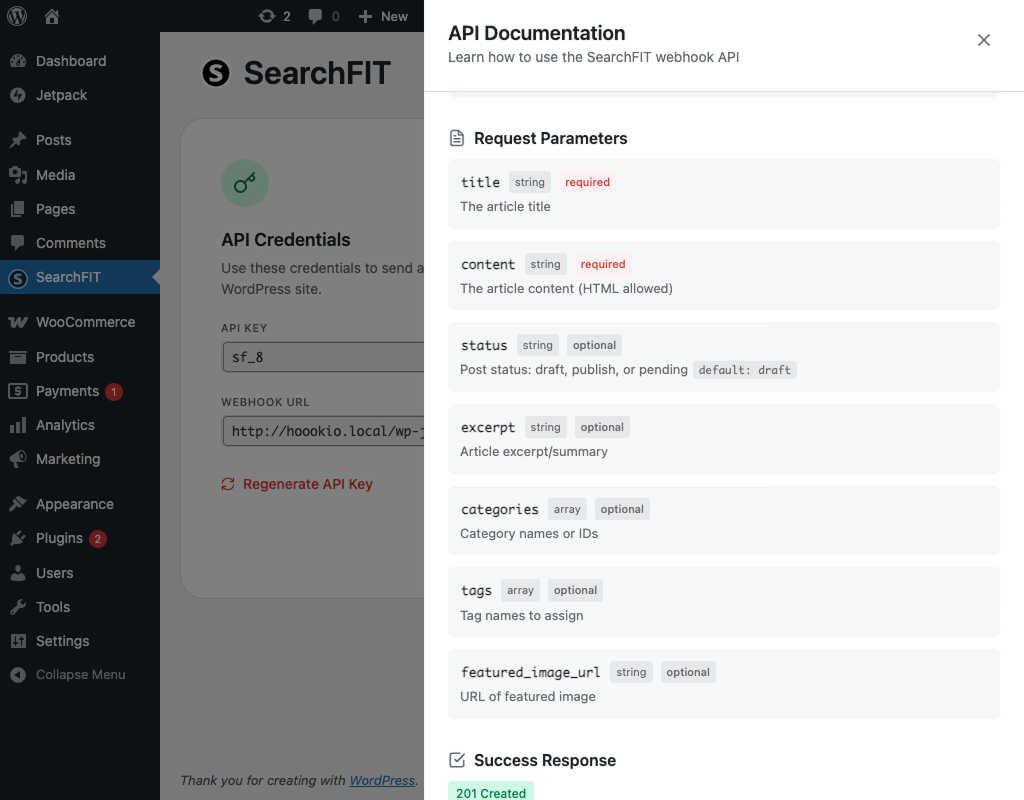
draft,
pending,publish. Default isdraft(configurable in settings). -
How do featured images work?
-
Send
featured_image_url(string) or afeatured_imageobject with metadata. The plugin downloads the image, adds it to the Media Library, and sets it as the featured image. URLs that resolve to private/loopback IPs are rejected. -
Can I use this with AI tools?
-
Yes — any tool that can make an HTTP request: ChatGPT, Claude, Perplexity, Gemini, Zapier, Make, n8n, custom scripts, etc.
-
What happens to categories that don’t exist?
-
They’re created automatically. You can also pass existing category IDs.
-
Does it support custom post types?
-
Not yet — it creates standard posts only.
-
Can I set custom meta fields?
-
Yes, via the
metafield. Underscore-prefixed keys are rejected unless you explicitly allow them through thesearchfit_allow_meta_keyfilter — this prevents writes to WordPress internals like_edit_lockor_thumbnail_id. -
Is there a rate limit?
-
No application-level rate limit. Your host or WAF may enforce one.
-
How do I send updates?
-
POST /wp-json/searchfit/v1/articles/{id} (POST, not PUT — many WAFs block non-GET/POST methods). Or include a
slugin the create request to upsert by slug. -
Where can I get support?
-
searchfit.ai or the WordPress.org support forum.
Reviews
There are no reviews for this plugin.
Contributors & Developers
“SearchFIT” is open source software. The following people have contributed to this plugin.
Contributors
Translate “SearchFIT” into your language.
Interested in development?
Browse the code, check out the SVN repository, or subscribe to the development log by RSS.
Changelog
1.4.0
- New: Bulk CSV import — a second ingestion mode alongside the webhook. Import a SearchFIT content-export CSV (Title, Slug, Type, Status, Locale, Target Keyword, Meta Description, Content, and more) directly from the admin screen, with a preview of the file before importing.
- New: SearchFIT exports the Content column as Markdown, so the importer converts it to clean post HTML automatically — no format choice to make.
- New: Self-contained Markdown-to-HTML converter (headings, links, images, bold/italic, inline & fenced code, blockquotes, ordered/unordered lists, GitHub task lists, horizontal rules, and pipe tables).
- New: Imports are matched to existing posts by slug (update or skip), run in AJAX batches with a live progress bar, and can force a post status or preserve the CSV’s scheduled dates.
- New: Webhook Defaults (default category, tags, and author) are now also applied to newly created posts during CSV import.
- New: SearchFIT export columns (Type, Word Count, Read Time, Article Score, Keyword Difficulty, Search Volume, Target Keyword, Locale, Scheduled Date) are stored as post meta; Meta Description and Target Keyword sync to Yoast / Rank Math / SEOPress / AIOSEO.
- UI: Consistent card corner radius across the admin screen and a single button style for all actions.
1.3.0
- Security: SSRF guard rejects URL fetches that resolve to private/loopback/link-local/reserved IPs (IPv4 and IPv6).
- Security: Custom-meta denylist for
_searchfit_*,_edit_lock,_thumbnail_id, and other WordPress-internal keys. - Security: Iframes opt-in (off by default) with a strict host allowlist; non-allowlisted iframes stripped, https forced on the rest.
- Security: JSON-LD scripts JSON-validated and re-encoded with
JSON_HEX_TAGflags before storage and<head>injection. - New: Slug-based upsert —
POST /articleswith aslugmatching an existing post updates it instead of duplicating. - New: SEO meta sync to Yoast, Rank Math, SEOPress, and AIOSEO via new
meta_descriptionandkeywordsfields. - New: Multilingual support via Polylang
pll_set_post_language()and WPML’swpml_set_element_language_detailsaction. - New: HTML normalization (
balanceTags, fix<p><div>nesting, drop stray</a>). - New: Settings UI for default post status, author, category, tags, embeds, hero deduplication — all via the WordPress Settings API.
- Fix: Removed double-upload of inline content images.
1.2.0
- WAF compatibility: API key validated inside each handler instead of in
permission_callback. - WAF compatibility: Update endpoint accepts
POSTinstead ofPUT/PATCH(breaking change for callers that usedPUT/PATCH). - WAF compatibility: Health check endpoint is now public.
X-API-Keyis now the recommended auth header (X-SearchFIT-API-KeyandAuthorization: Bearerstill accepted).
1.1.1
- Updated plugin logo and icons.
1.1.0
- Full CRUD API: list, read, create, update articles.
- Filtering by status / author / search; sorting; pagination.
- Featured image by
attachment_idto reuse existing media. - Custom meta fields and configurable default author.
1.0.0
- Initial release: webhook article creation, API key auth, featured + content images, categories, tags, draft/pending/publish, health check, activity log.